

Home > Fax > Receive a Fax > Receive Mode Settings > Choose the Correct Receive Mode


Choose the Correct Receive Mode
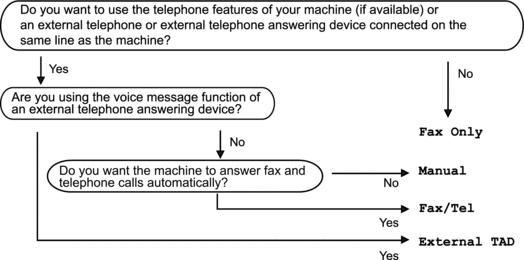
You must choose a Receive Mode depending on the external devices and telephone services you have on your line.
By default, your machine automatically will receive any faxes that are sent to it. The diagram below will help you select the correct mode.
- Press
 .
.  If your machine displays the [All Settings] menu on the Home screen, skip the [Settings] menu.
If the option to change the Receive Mode is unavailable, make sure the BT Call Sign feature is set to [Off].
- Press [Fax Only], [Fax/Tel], [External TAD], or [Manual].
- Press
 .
.
Did you find the information you needed?