


| | |
| 1 | Create a file in any application on your PC. | ||||||
| 2 | Click File, then Print. The Print dialog box appears: 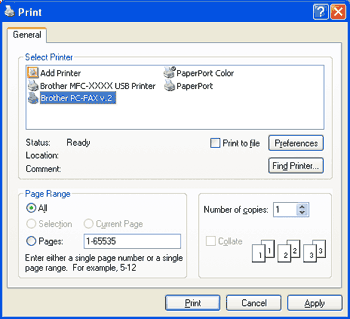 | ||||||
| 3 | Choose Brother PC-FAX v.2 as your printer, and then click Print. The Facsimile style user interface appears: 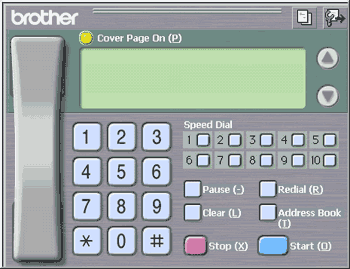  Note Note
| ||||||
| 4 | Enter a fax number using any of the following methods:
If you make a mistake, click Clear to delete all the entries. | ||||||
| 5 | To include a cover page, click  Cover Page On. Note Cover Page On. Note | ||||||
| 6 | Click Start to send the fax. |
Note| | |
 icon to create or edit a cover page.