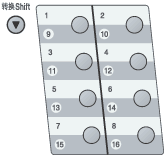
Your machine has 8 One Touch keys where you can store 16 fax or telephone numbers for automatic dialling. To access numbers 9 to 16, hold down Shift as you press the One Touch key.
| 1 | Press the One Touch key where you want to store the number. If a number is not stored there, the LCD shows Register Now?. Press 1 to choose Yes. |
| 2 | Enter the number (up to 20 characters). Press OK. |
| 3 | Choose one of the options below: | • | Enter the name using the dial pad (up to 10 characters for Chinese or 20 characters for alphanumeric). Press OK. | | • | Press OK to store the number without a name. |
|
| 4 | Do one of the following: | • | Enter the pinyin using the dial pad (up to 15 characters). Press OK. | | • | Press OK to store the number without a pinyin. |
|
| 5 | If you want to save a fax resolution along with the number, choose one of the options below: | • | To store the fax resolution, press  or  to select Std, Fine, S.Fine or Photo. Press OK. | | • | Press OK if you don’t want to change the default resolution. The default setting is Std. |
|

Note
| | You can also store the number by pressing Menu, 2, 3, 1. |