| | |
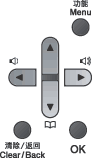
| 1 | Press Menu. | ||||||||||
| 2 | Choose an option.
You can also scroll through each menu level by pressing  or or  for the direction you want. for the direction you want. | ||||||||||
| 3 | Press OK when the option you want appears on the LCD. The LCD will then show the next menu level. | ||||||||||
| 4 | Press or to scroll to your next menu selection. | ||||||||||
| 5 | Press OK. When you have finished setting an option, the LCD will show Accepted. | ||||||||||
| 6 | Press Stop/Exit to exit Menu mode. |
| | |