

Home > Troubleshooting > Document Jams > Document is Jammed in the Top of the ADF Unit


Document is Jammed in the Top of the ADF Unit
- Remove any paper from the ADF that is not jammed.
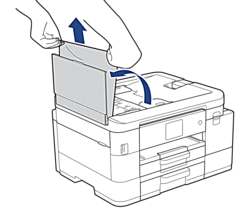
- Open the ADF cover.
- Remove the jammed document by pulling it upwards.
- Close the ADF cover.
- Press Stop/Exit or
 .
. - IMPORTANT
- To avoid future document jams, close the ADF cover correctly by pressing it down in the centre.
Did you find the information you needed?