

Home > Fax > PC-FAX > PC-FAX for Windows > Send a Fax Using PC-FAX (Windows)


Send a Fax Using PC-FAX (Windows)
PC-FAX supports only monochrome faxes. A monochrome fax will be sent even if the original data is colour and the receiving fax machine supports colour faxes.
- Create a file in any application on your computer.
- Select the print command in your application.
- Select Brother PC-FAX as your printer, and then complete your print operation.The Brother PC-FAX dialog box appears.
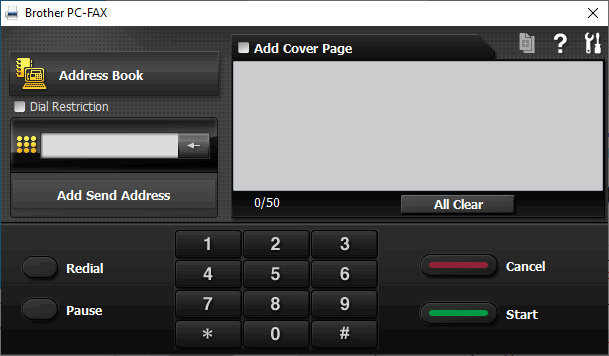
- Type a fax number using one of the following methods:
- Click the numbers on the dial pad to type the number, and then click Add Send Address.
 If you select the Dial Restriction checkbox, a confirmation dialog box will appear for you to re-type the fax number using the keyboard. This feature helps to prevent transmissions to the wrong destination.
 - Click the Address Book button, and then select a member or group from the Address Book.
If you make a mistake, click All Clear to delete all entries.
- To include a cover page, select the Add Cover Page checkbox. You can also click
 to create or edit a cover page.
 - Click Start to send the fax.
- To cancel the fax, click Cancel.
- To redial a number, click Redial to show the last five fax numbers, select a number, and then click Start.
Did you find the information you needed?