

Home > Routine Maintenance > Clean the Machine > Clean the Scanner


Clean the Scanner
Before starting the cleaning procedure, see Related Information: Clean the Machine.
- Press and hold
 to turn the machine off.
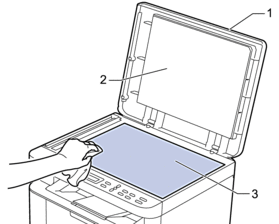
 - Lift the document cover (1). Clean the white plastic surface (2) and scanner glass (3) underneath it with a soft lint-free cloth moistened with water.
- Close the document cover.
- Press to turn the machine on.
Did you find the information you needed?