Scanning a duplex document
1
Load your document.
2
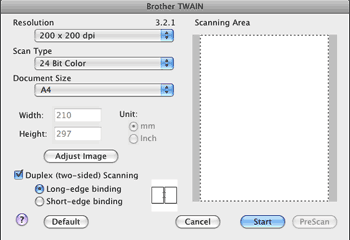
Check
Duplex(two-sided) Scanning
and choose
Long-edge binding
or
Short-edge binding
.
3
Adjust the following settings, if needed, in the Scanner Setup dialog box:
•
Resolution
•
Scan Type
•
Document Size
•
Adjust Image
•
Brightness
•
Contrast
4
Click
Start
.
Note
•
You cannot adjust the scanning area.
•
Duplex scan is not supported by the MFC-8480DN.
•
Duplex scan is not available for legal size paper.
•
Duplex scan is available from the ADF only.
Page Top


 Note
Note