| | |
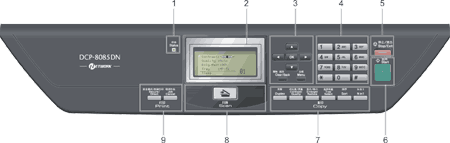
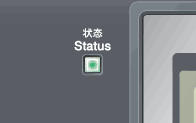
| 1. | Status LED The LED will flash and change colour depending on the machine status. | ||||
| 2. | Displays messages to help you set up and use your machine. | ||||
| 3. | Menu keys: Menu Lets you access the Menu to program your settings in this machine. Clear/Back Deletes entered data or lets you cancel the current setting. OK Lets you store your settings in the machine.  or or  Press to scroll backwards or forwards through menu selections.  or or  Press to scroll through the menus and options. | ||||
| 4. | Numeric keys Use these keys to enter text. | ||||
| 5. | Stop/Exit Stops an operation or exits from a menu. | ||||
| 6. | Start Lets you start making copies or scanning. | ||||
| 7. | Duplex You can choose Duplex to copy on both sides of the paper. Contrast/Quality Lets you change the quality or contrast for the next copy. Enlarge/Reduce Reduces or enlarges copies. Tray Select Lets you change which tray will be used for the next copy. Sort Sorts multiple copies using the ADF. N in 1 You can choose N in 1 to copy 2 or 4 pages onto one page. | ||||
| 8. |  Scan ScanPuts the machine in Scan mode. (For details about scanning, see the Software User’s Guide on the CD-ROM.) | ||||
| 9. | This key has two functions.
Cancels a programmed print job and clears it from the machine’s memory. To cancel multiple print jobs, hold down this key until the LCD shows Job Cancel (All). |
 Note
Note| | |