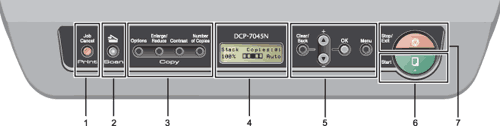
Control panel overview

DCP-7030, DCP-7040 and DCP-7045N have the same keys.
Graphic
1.
Print key
Job Cancel
Cancels a programmed print job and clears it from the machine’s memory.
To cancel multiple print jobs, hold down this key until the LCD shows Job Cancel (All).
2.
Scan key
Puts the machine in Scan mode. (For details about scanning, see the Software User’s Guide on the CD-ROM.)
3.
Copy keys:
Options
You can quickly and easily choose temporary settings for copying.
Enlarge/Reduce
Reduces or enlarges copies.
Contrast
You can increase or decrease the contrast of your copies.
Number of Copies
Use this key to make multiple copies.
4.
LCD
Displays messages to help you set up and use your machine.
5.
Menu keys:
Clear/Back
Deletes entered data or lets you cancel the current setting.
Bsymbol.utri + or Bsymbol.dtri -
Press to scroll through the menus and options.
OK
Lets you store your settings in the machine.
Menu
Lets you access the Menu to program your settings in this machine.
6.
Start
Lets you start making copies or scanning.
7.
Stop/Exit
Stops an operation or exits from a menu.