

Home > Paper Handling > Load Documents > Load a Plastic Card


Load a Plastic Card
- Load only one plastic card at a time.
- Load the plastic card long edge first.
- Certain types of plastic cards may be scratched when scanned. To prevent damage to the card, we recommended using the Carrier Sheet.
- If the surface of the card is dirty with grease marks (for example, fingerprints) or similar, wipe the dirt off before scanning.
- Certain types of embossed cards may not scan correctly.
- (DSmobile DS-740De/DSmobile DS-940DWe) Confirm the Output Guide is closed.
- Set the card top edge first into the Feeder Slot and align the left edge of the card with the Left Edge of the Feeder Slot.
- NOTE
- If you insert an embossed card, make sure to insert it embossed side up into the Feeder Slot.
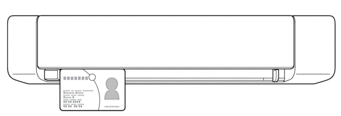
- Slide the Document Guide until it touches the right side of the card.
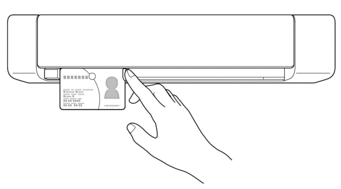
- Gently insert the card until you feel its top edge touch the inside of the scanner.
(DSmobile DS-940DWe) When the machine is in microSD Mode, scanning begins automatically.
Did you find the information you needed?