

Home > Scan > Scan Using the Scan Functions on Your Brother Machine > Save Scanned Documents to a Memory Card


Save Scanned Documents to a Memory Card
You must format the microSD memory card first using a computer.
- Slide the Mode Select Switch to
 .
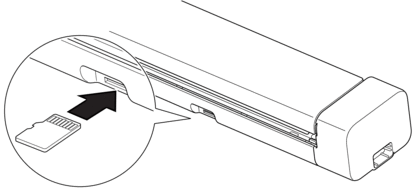
- Gently insert the microSD memory card into the scanner's Memory Card Slot with the metal contact points facing upward.The SD Card LED lights in white.
- Adjust the scan settings by pressing the Colour/Mono, PDF/JPEG, or 2side/1side Switching Buttons on the control panel as needed.

If your machine is connected via a network, we recommend using Web Based Management to configure the scan settings.
- Load your document.The machine starts scanning automatically.
When finished, the scanned image is stored on the microSD memory card.
Did you find the information you needed?