

Home > Appendix > Optional Accessories > Linerless Platen Kit (Optional: PA-LPR-004/PA-LPR-001) > Install the Linerless Platen Kit


Install the Linerless Platen Kit
This printer is compatible with linerless media.
Parts Description
Linerless Platen  | Screws (2)  |
- Push the Roll Cover Release Lever to open the Roll Compartment Cover.
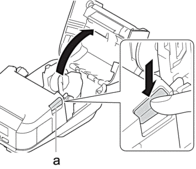
- Roll Cover Release Lever
- Remove the standard platen by removing the two screws shown in the illustration.
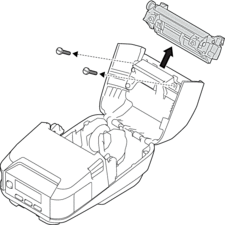
- CAUTION
- Do not touch the blade when removing the standard platen.
 Recommended tightening torque: 0.4±0.049 N·m.
 - Install the Linerless Platen, and fasten it using the two screws included in the Linerless Platen Kit.
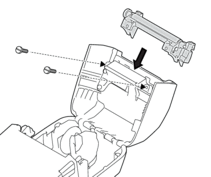 The lower tear bar cannot be used when the Linerless Platen is installed.
 - Set Linerless to On in the Advanced tab of the BRConfiguration Tool.
- NOTE
-
When Linerless is set to On, [Tear Bar] in [Settings] and [Auto Detect] in [Media] cannot be selected on the printer's LCD.
- For best performance, make sure the paper's head margin is as follows:
- RJ-3235B/RJ-3255WB: At least 12 mm
- RJ-4235B/RJ-4255WB: At least 9 mm
- When using the Linerless Platen, paper dust may stick to the print head. Clean the print head regularly. For more information, see Related Topics:
- Use the latest firmware when printing with the Linerless Platen.
Did you find the information you needed?