



Change the Cutting Options (Windows)
The cutting options allow you to specify how labels are fed and cut. You can change the cutting options in the printer driver by following these steps:
- Click Printing Preferences in the printer driver.
- Select the Cut Every checkbox, and then select where to cut when multiple labels are printed.
- Select the Cut at End checkbox.
- Click OK.
Label Cutting Options
| Auto Cut (Cut every one label) | Cut at End | Example |
|---|
| Off | On | 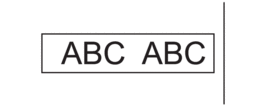 |
| Off | Off |  |
| On | On or Off |  |
Did you find the information you needed?