

Home > Set Up Your Printer > LCD Overview


LCD Overview

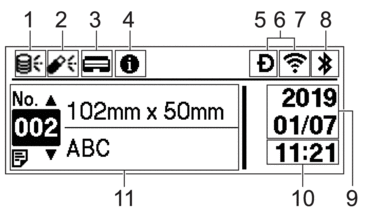 |
- Update icon (Network)
Indicates that updated templates, databases, and other data are available.
 There is new data.(flashing)
 There is incomplete update data.(flashing)
 Cannot connect to the server.
- Remote Data Update (FTP)
Allows you to connect your printer to the FTP server to perform template and database updates, and to execute commands to distribute update data among multiple printers connected to a network.
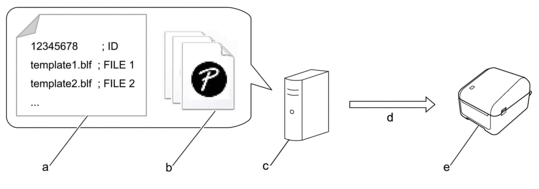
- Settings file (updateinfo.ini)
Files you want to update, such as template and database files (BLF/BIN files)
To convert a label file (LBX) or database file (Excel, CSV) to a BLF file, use P-touch Editor.
- FTP Server
- Retrieval of update data from the FTP server
- Printer (FTP Client)
For more information on how to update data, visit the Brother support website at support.brother.com.
- Update icon (USB Flash Drive)
Indicates that updated templates, databases, and other data are available.
 There is new data.(flashing)
 There is remaining update data.
- Local Data Update (USB Flash Drive)
Allows you to perform template and database updates and execute commands after reading the files from a USB Flash Drive connected to the printer.
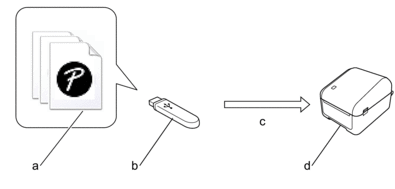
- Files you want to update data, such as template and database files (BLF/BIN files)
- USB Flash Drive
- Retrieval of update data
- Printer
For more information on how to update data, see Related Topics: Update and Back Up Data using USB Flash Drive.
- Print Head Status icon
 Normal state.
 The Print Head is disconnected or there is a problem with the Print Head.
 Information icon

There is a notification you should read.
- Wireless Direct icon
 Wireless Direct mode is on.
Your printer is not connected to the mobile device.
 Wireless Direct mode is on.
Your printer is connected to the mobile device.
- WLAN icon
 Your printer is connected to the network.
 Your printer is searching for a wireless network.
 Wired LAN icon
 Your printer is connected to the network.
- Bluetooth® icon
 Bluetooth mode is on.
Your printer is not connected to the mobile device.
 Bluetooth mode is connected.
Your printer is connected to the mobile device.
(flashing) The Auto Reconnect function is on, but your printer is not connected to the mobile device. - Date display
- Time display
- Template
- NOTE
- The printer may malfunction if you try to configure it while it is processing or printing a print job.