

Home > Set Up Your Printer > Set the Date and Time


Set the Date and Time
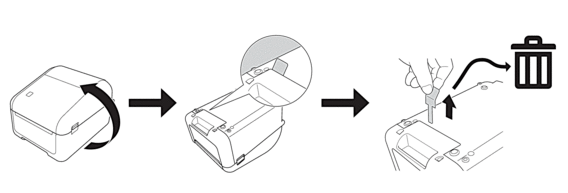
| A coin battery (CR2032) is required to retain the clock settings and may be included with your printer, depending on your country or region. If the battery is included, it comes with a protective tab to prevent battery drain, as shown. Remove and discard the tab before use. |
 |
- Press Menu.
- Press
 or
or  to select the following:
 - Select [Administration]. Press OK.
- Select [Time & date]. Press OK.
- Select [Set Clock]. Press OK.
- Press or to set the year, and then press OK. Repeat this step for setting the month and day.
- Press or to select [AM], [PM], or [24], and then press OK.
- Press or to set the hour, and then press OK. Repeat this step for setting the minute.
 To change the date and time format, select or , and then specify the settings.
Did you find the information you needed?